
A repair invoice arrives with an alteration flag. A damage photo looks convincing, but the supporting video has no usable assessment for the relevant moment. The adjuster needs a next action that fits the evidence, without turning a technical warning into an accusation. Claims fraud detection becomes useful when the file records what raised concern, what remains unknown and who owns the follow-up.
Start with the disputed claim fact
For submitted evidence, claims fraud detection includes reviewing documents, photos and video for signs of fabrication or alteration. The practical question is how much reliance the claims team can place on each file. File screening supplies one part of that answer; it does not establish whether the loss happened as described.
At Trustable, we check submitted claim photos for edits and AI-generation traces, and repair invoices and receipts for edited text, layout mismatches and inconsistent totals. Our claims evidence checks supply findings and their locations for adjusters and investigators to review. We also check recorded video for face swaps and other signs of generation or editing.
These checks fit between evidence intake and reliance on the submission. Reading an invoice total into a claims system is a separate processing task. The insurer owns corroboration, investigation and the claim decision. Cross-document checks and routing results into claims systems are in development at Trustable.
Before interpreting a result, write down the claim fact the file is meant to support:
- Does the invoice support the amount claimed for the repair?
- Do the photos show the damage at the insured property or asset?
- Does the video show the relevant condition clearly enough to support the adjuster's assessment?
- Is the submitted record consistent with the loss account and other evidence?
Keep authenticity and claim relevance separate. A genuine photograph can depict a different property, an earlier loss or a staged scene. An authentic invoice can concern work unrelated to the claim. Conversely, an edited file may contain a harmless annotation or an authorized correction.
A detector score or signal strength is not a calibrated probability of claims fraud, overall model accuracy, ground truth or proof of intent. It cannot determine coverage or a settlement. A result with no detected manipulation also leaves the underlying claim facts to be established.
Scam AI's detection evidence guide explains how a score for one input differs from accuracy across a test set. Its media-response examples are specific to Scam AI.
Preserve the submission before processing it
Keep the file as received, including the original PDF, image or video where available. A screenshot of a document is a different evidence item from the document itself. A portal-generated preview is a derivative, even when it looks identical to the upload.
Create an intake record that connects the file to the claim:
| Intake field | What to retain |
|---|---|
| File identity | Claim reference, evidence ID, filename, format and storage location |
| Receipt | Submission channel, sender and receipt time, including time zone |
| Integrity | A cryptographic hash of the received file and a protected record of that hash |
| Processing history | Each conversion, crop, extraction or redaction, with its working-copy ID |
| Access and transfer | Who handled the evidence, when and why |
The National Institute of Standards and Technology's digital evidence guidance recommends recording source information and using securely stored hashes to support file integrity. A hash helps establish that the same file has been retained. It does not establish that the submitted content was truthful.
Use the insurer's retention, privacy and evidence-handling policy for storage and access. Analyze a working copy. Preserve the relationship between that copy and the received file, especially when analysis requires conversion. Store the detector response alongside the exact input used for that run. An annotation highlighting a suspect area belongs on a separate review copy.
What the result can actually support
Begin with task fit. Accepting a video format does not mean a detector assesses every possible alteration in that video. A face-swap finding does not establish whether the speaker's account is true. A whole-file result does not identify which invoice field changed.
Retain the result, reasons, signal strength and any supplied tool or model version. Record the scope of the assessment: the full file, selected pages, a region or particular video frames. Available detail varies by tool and input. A page marker, heatmap or timestamp is useful only when the result actually supplies it; do not invent localization from a file-level flag.
When a repair invoice is flagged
The reviewer needs the full invoice, the flagged page and the exact field or region identified by the document tool, where supplied. Retain the tool's reason and any localization as model output. If there is only a whole-file flag, record that limitation.
Compare the questioned amount with the line items, totals, repair estimate and other claim records. Obtain the issued version from the repairer through an independently established contact channel, using the insurer's authorized process. Capture any explanation for a correction or reissue.
For example, an amount field might look different because the repairer issued a revised invoice. An unexplained difference between the submitted invoice and the repairer's issued copy is a different concern. The case note should say which situation the evidence supports.
For photos and video
Where a tool supplies localized image evidence, review the highlighted region in the full scene. For a flagged video frame, watch the surrounding sequence and record its timestamp. Note whether the concern affects the damage or asset detail that matters to the claim, or a peripheral part of the scene.
Separate a visible observation, such as an inconsistent edge around a damaged panel, from the model's interpretation of it. Avoid labeling an area “fabricated” solely because a heatmap emphasizes it. Our claim photo guide covers the initial visual and source checks; a disputed finding still needs claim-specific follow-up.
The Scientific Working Group on Digital Evidence's image authentication guidance, version 2.0, calls for examining both scene content and file structure. It also notes that metadata can be absent or altered, and that physical staging may require comparison with the actual scene or other imagery.
A missing location tag is therefore a gap in source information. It is not evidence that the photograph was fabricated. An apparently ordinary file also leaves the claim's circumstances unresolved until the relevant facts are corroborated.
Missing results need a recovery path
A successful upload and a complete evidence assessment are different things. Processing can fail, an input can be unsuitable, or the returned assessment can cover only part of the evidence. An absent score or finding means nothing about authenticity until the reason and scope are understood.
Where a video tool samples frames, its results cover those samples. A low signal in one frame says nothing about an unassessed frame or the time between samples. The same principle applies to a document with missing pages or an image whose relevant detail is unreadable.
Use the failure reason supplied by the service and its documented handling instructions to choose the recovery path. The next action also depends on which claim evidence remains unassessed.
| Evidence gap | Next action | What remains in the case record |
|---|---|---|
| Temporary processing failure | Have the technical owner establish whether the original run completed before retrying under the service's runbook. Escalate persistent failures. | Run or request ID where supplied, status lookup, affected content, retry reason and outcome |
| Unsupported or unreadable input | Obtain the source file or create a supported working copy without overwriting the received file. | Input limitation, conversion details and link between versions |
| No usable assessment for the tool's task | Identify why assessment was unavailable. Obtain usable content or choose another review method; an unchanged unsuitable file may produce the same gap. | Reported reason, unresolved claim question and chosen alternative |
| Only part of a video was assessed | Obtain the full file if incomplete, and route material uncovered portions to an appropriate review method. | Full duration, assessed intervals and any known sampling or truncation limits |
| Missing pages, obscured damage or absent views | Request the specific missing page or view, or arrange an appropriate inspection. | The claim fact that could not be assessed and the request owner |
An absent field can also be normal for the modality. A document result need not contain video timestamps. Distinguish “this field does not apply” from “the system could not assess the relevant evidence.”
Locate every gap against the disputed claim fact. If the only view of a claimed damaged component falls in an unassessed interval, results before and after it do not resolve that question. If the uncovered footage is unrelated to the disputed condition, record why it does not affect this review.
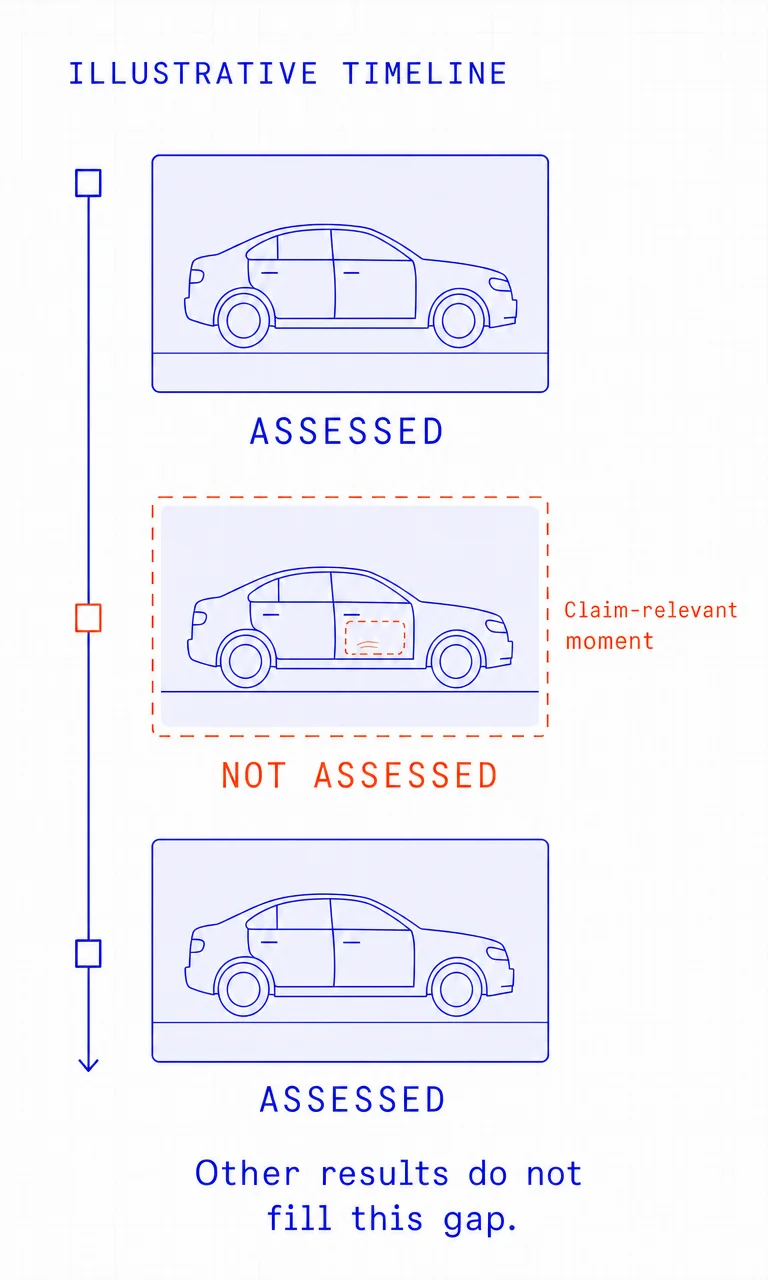
Give each unresolved material gap an owner and follow-up date. A processing exception should not become a fraud allegation or an unattended queue entry.
Corroboration has to answer the concern
Corroboration needs a source independent of the suspicious submission. Two copies of the same uploaded invoice supply no additional confirmation. Two detector outputs may respond to the same artifact, so agreement between them does not establish the underlying claim fact.
Choose the next evidence source to match the uncertainty:
| Concern | Useful corroboration |
|---|---|
| An invoice amount may have changed | Issuer-supplied invoice, revision history or repairer explanation obtained through an established channel |
| A photo may show a different asset | Claim-linked asset identifiers, wider contextual views or an appropriate inspection |
| Damage may predate the reported loss | Relevant prior condition records and loss-related documentation available through authorized channels |
| A video does not show the relevant condition | Full original recording, additional views or a focused inspection |
Provenance can help establish a file's history. The Coalition for Content Provenance and Authenticity's Content Credentials explainer makes clear that provenance alone cannot establish whether depicted content is factual. Keep capture history distinct from evidence that the loss occurred as described.
When fresh capture is the right next step
Screening an already-submitted file examines evidence that exists. Guided remote capture or an inspection creates a new evidence item to answer a defined question. That is a separate collection process, not a capability implied by submitted-file screening.
When the adjuster needs current contextual views, specify the asset identifier, wider scene and close-up needed, using the insurer's approved capture or inspection process. Retain the original submission and its unresolved issues alongside the new material. Do not assume the collection method establishes time, location, liveness or an unbroken capture history unless it actually supplies evidence for those properties.
Fresh capture records present condition. It cannot recreate the historical state of an asset after repairs, cleanup or further damage. Specify the question it can answer; use another evidence source for questions it cannot resolve.
Choosing the review route
We recommend routing by evidence completeness, relevance and consequence together. A severe-looking signal with little usable evidence and a well-supported material discrepancy require different follow-up. The routes are insurer-owned responsibilities, rather than automatic claim outcomes from a detector.
| Evidence state | Review route | Accountable owner |
|---|---|---|
| Relevant evidence is complete, no strong manipulation signals appear and other claim records are consistent | Return to standard claim handling. Any approval still follows normal coverage and settlement authority. | Assigned adjuster |
| A specific missing file or view is recoverable | Request the original, missing material or fresh capture. Record why it is needed. | Adjuster or designated evidence-collection owner |
| A discrepancy remains unexplained | Apply the targeted step-up review defined by insurer policy, such as issuer corroboration or inspection. | Adjuster or specialist reviewer |
| A material concern persists after corroboration, or requires specialist examination | Refer a documented question and supporting packet to the special investigations unit (SIU) or forensic specialist. | Named receiving investigator |
| Technical failures prevent assessment | Route the processing issue to technical support and the unresolved evidence question to the adjuster. | Technical owner and adjuster, with separate responsibilities |
Referral is a review action. It does not prove fraud, and it should not silently transfer every claims-handling responsibility to the investigator. Record who retains responsibility for claimant communications and ordinary claim progress while the referral is considered.
A handoff the investigator can reconstruct
A useful referral lets the next reviewer understand the concern without rebuilding the file. Include:
- The question and its significance: the claim fact at issue and why the discrepancy could matter.
- The evidence inventory: received files, hashes, working copies and source history.
- The unmodified detection record: supplied run ID, tool or model version, result, signal strength, relevant page or timestamp, and missing-result reasons. Record unavailable detail as a limitation.
- Reviewer observations: what a person saw, separated from the detector's interpretation.
- Corroboration and alternative explanations: supporting records, contradictory evidence, issuer responses and unresolved limits.
- The handoff: referral reason, policy route, sending reviewer, named recipient, acceptance status and next review date.
An illustrative case note might read:
The document tool flagged the invoice total. The received PDF and run response are retained. A copy supplied by the repairer through an established contact channel shows a different total. The reason for the difference remains unresolved. Referred to the named SIU investigator for assessment; the adjuster retains claimant communications. No fraud or coverage conclusion has been recorded.
Record the receiving team's acceptance, return or closure of the referral, with reasons. Keep the later finding separate from the original detector output. That separation preserves what the system reported, what the reviewer learned and who decided the next action.
Book a demo to discuss where Trustable's submitted-file checks fit in your claims evidence-review process. We agree on data handling before files are shared.